Navigating the Perils: The Precarious Depths of Device Code Phishing in Azure AD
Felix Aeppli
Swiss Cyber Storm 2023 · Day 1 · Panorama
Overview
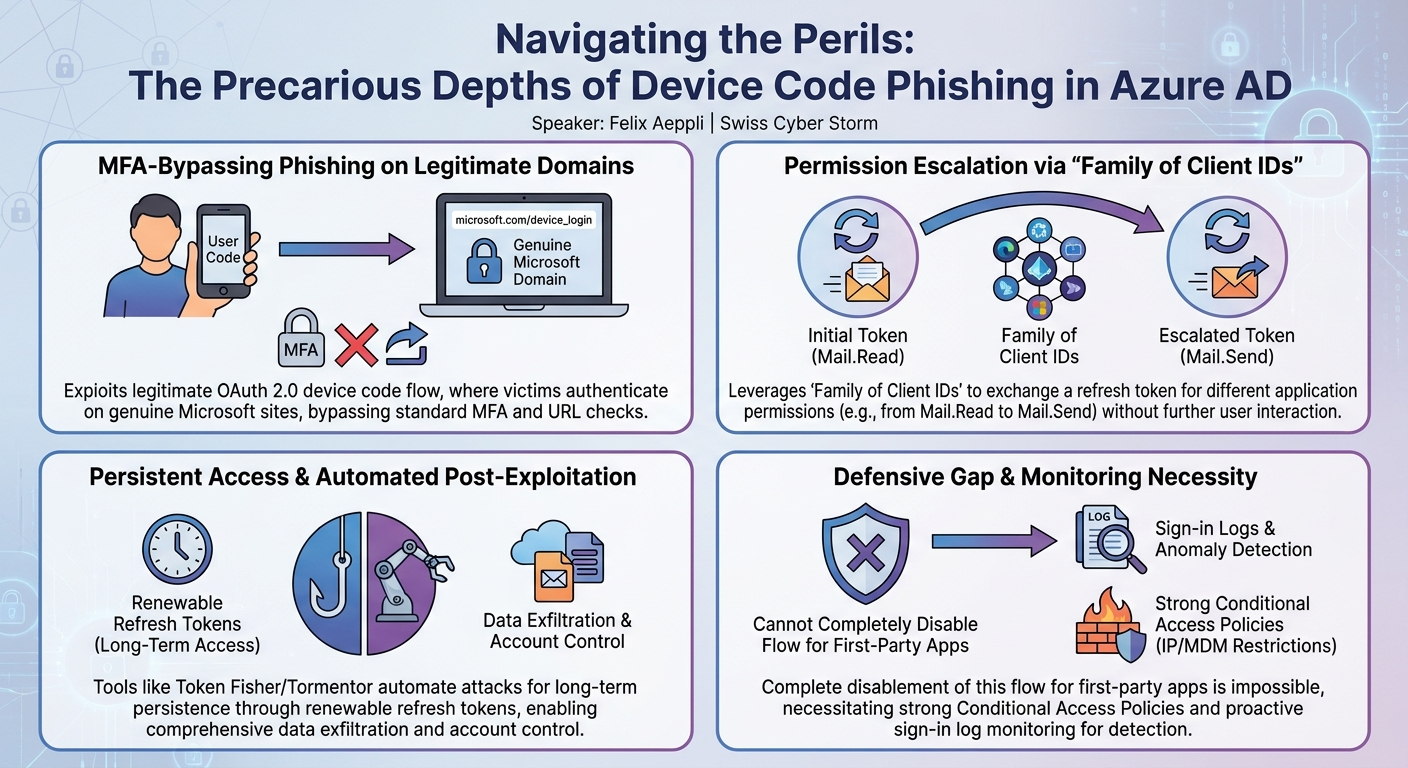
In this compelling talk at Swiss Cyber Storm, Felix Aeppli sheds light on one of his "favorite fishing methods ever": device code phishing within the Microsoft Entra ID (formerly Azure AD) environment. Aeppli argues that this sophisticated technique is highly underrated by both the cybersecurity community and threat actors, despite its potent capabilities. The presentation meticulously dissects the underlying OAuth 2.0 Device Authorization Grant flow, demonstrating how it can be abused to gain persistent access to Microsoft 365 accounts, bypassing traditional phishing defenses and even multi-factor authentication (MFA).
Key moments
- 0:00 Introduction to Device Code Phishing in Azure AD
- 1:00 Understanding the OAuth Device Authorization Flow
- 3:07 Access Tokens vs. Refresh Tokens Explained
- 5:10 How Device Code Phishing is Performed
- 8:15 Leveraging 'Family of Client IDs' for Broader Permissions
- 10:00 Key Advantages of Device Code Phishing Attacks
- 13:00 TokenFisher: Overcoming Device Code Phishing Limitations
- 17:00 Mitigation and Detection Strategies for Device Code Phishing
Navigating the Perils: The Precarious Depths of Device Code Phishing in Azure AD
Speakers: Felix Aeppli
Conference: Swiss Cyber Storm
YouTube: https://www.youtube.com/watch?v=qLGIt4OOmwM
Overview
In this compelling talk at Swiss Cyber Storm, Felix Aeppli sheds light on one of his "favorite fishing methods ever": device code phishing within the Microsoft Entra ID (formerly Azure AD) environment. Aeppli argues that this sophisticated technique is highly underrated by both the cybersecurity community and threat actors, despite its potent capabilities. The presentation meticulously dissects the underlying OAuth 2.0 Device Authorization Grant flow, demonstrating how it can be abused to gain persistent access to Microsoft 365 accounts, bypassing traditional phishing defenses and even multi-factor authentication (MFA).
The talk underscores the critical role of the "human factor" in the success of these attacks, as victims are manipulated into authenticating on legitimate Microsoft domains. Aeppli reveals how clever abuse of Microsoft's "Family of Client IDs" feature can escalate initial access permissions dramatically, allowing attackers to pivot from merely reading emails to sending them and gaining broad control over a victim's account without requiring further user interaction. This deep dive into a less-understood attack vector provides invaluable insights for both red teamers seeking advanced techniques and blue teamers aiming to bolster their defenses against evolving threats.
Background
▶ Watch: Introduction to Device Code Phishing in Azure AD (0:00)
The foundation of device code phishing lies in the OAuth 2.0 Device Authorization Grant flow, often referred to as the device code flow. This authentication mechanism was designed to facilitate logins for input-constrained devices, such as smart TVs, IoT devices, or VoIP phones, where entering a complex password directly would be cumbersome. Aeppli illustrates this with a scenario involving a company phone integrated into Microsoft Teams, where a user needs to log in with their Azure account.
The standard device code flow operates as follows:
- Initiation: The user initiates a login on the input-constrained device (e.g., by pressing a button). The device sends a request to the Entra ID identity provider (IDP) to start the authorization grant flow.
- User Code Display: The device displays a unique, short user code to the user along with instructions to navigate to a specific Microsoft URL, typically
microsoft.com/device_login. In the background, the device begins polling the IDP to check if authentication has occurred. - User Authentication: The user opens a web browser on a separate, input-rich device (e.g., a laptop), navigates to
microsoft.com/device_login, and enters the provided user code. - Credential Entry & Consent: The user is then prompted to enter their username, password, and any required second factor (MFA). Crucially, this authentication happens on a legitimate Microsoft domain, making it resistant to typical URL-based phishing detection. After successful authentication, the user must grant consent for the device (or application) to access specified resources (e.g., "Yes, I really want to log into this Yealink phone").
- Token Issuance: Once consent is given, the IDP issues an access token and a refresh token to the polling device. The user's browser is instructed to close, completing their part of the process.
Aeppli then details the two primary types of tokens involved:
- Access Token: Used to access specific APIs (e.g., Microsoft Graph). It is always limited to a specific API and scope (e.g.,
Mail.Readfor Microsoft Graph). Access tokens are typically valid for 60 to 90 minutes and, critically, cannot be revoked in Entra ID by default. This means even if a user's account is disabled or password changed, an active access token remains valid until its expiry. - Refresh Token: Cannot directly access APIs but is used to obtain new access tokens. A refresh token is initially valid for 90 minutes but can be indefinitely renewed for 90 days each time it's used. Unlike access tokens, refresh tokens can be revoked, for instance, by a password change or administrative action.
The inherent vulnerability lies in the flow's design: it allows for an authentication process to be initiated on one "device" (which can be an attacker-controlled application) and completed by a human user on a separate, trusted device. This separation creates a prime opportunity for phishing.
Key Findings
▶ Watch: Access Tokens vs. Refresh Tokens Explained (3:07)
Aeppli's core finding demonstrates how the legitimate device code flow can be weaponized for phishing. The attack begins with an attacker acting as a "device" initiating the flow. For instance, to read a victim's emails, an attacker might impersonate the Outlook Mobile application, which possesses the Mail.Read permission for the MS Graph API. The attacker initiates the flow, receives a user code, and then crafts a phishing email instructing the victim to visit microsoft.com/device_login and enter the code. Upon successful authentication and consent, the attacker gains an access token (for Mail.Read) and a refresh token.
The most significant and alarming finding is the abuse of Microsoft's "Family of Client IDs" feature. Aeppli explains that Microsoft, for reasons unclear, bundles certain first-party applications into "families" (currently only "Family 1" is known). Within the same family, a refresh token issued for one application can be exchanged for an access token associated with another application in that same family. This is a game-changer for attackers.
Consider the previous example where the attacker only had Mail.Read permissions via Outlook Mobile. If they wanted to send emails (Mail.Send), the Outlook Mobile application typically doesn't have that permission. However, if another application within "Family 1"—such as the Microsoft Whiteboard Client—does have Mail.Send permissions, the attacker can use the Outlook Mobile refresh token to request a new access token for the Microsoft Whiteboard Client, thereby acquiring Mail.Send capabilities without any further user interaction or re-phishing. This dramatically broadens an attacker's capabilities from a single, initial phishing success. Aeppli references SecureWorks research for a list of applications included in this family.
The advantages of this method are substantial:
- Authenticity: Victims authenticate directly on genuine Microsoft identity provider (IDP) sites, making traditional phishing indicators (like suspicious URLs) irrelevant.
- MFA Bypass: Since authentication occurs on the legitimate IDP, any MFA mechanisms, including hardware tokens like YubiKeys, are effectively bypassed from the attacker's perspective.
- Broad Capabilities: The "Family of Client IDs" feature grants extensive permissions and control over the victim's account once a refresh token is obtained, often beyond what the initial consent implied.
- Administrative Blind Spot: As of the talk, administrators cannot completely deactivate device code flows for Microsoft's first-party applications, leaving a significant gap in defensive capabilities.
- Persistence: Even if a victim changes their password or an administrator disables the account, harvested access tokens remain valid for their full 60-90 minute lifespan. If the compromise isn't detected, an attacker can indefinitely renew refresh tokens, maintaining long-term access.
- Advanced Persistence: Aeppli briefly mentions other research by Dion where attackers could backdoor an account by registering Windows Hello for Business login credentials, providing persistent access even after credential changes.
Technical Deep Dive
▶ Watch: Leveraging 'Family of Client IDs' for Broader Permissions (8:15)
The technical execution of a device code phishing attack, particularly with the "Family of Client IDs" escalation, is as follows:
- Initial Compromise Setup:
- The attacker, using a script or tool, initiates the OAuth 2.0 Device Authorization Grant flow with Microsoft Entra ID.
- The request specifies the target API (e.g.,
https://graph.microsoft.com/) and the desired application client ID (e.g., the client ID for Outlook Mobile) along with the required permissions (e.g.,Mail.Read). - Entra ID responds with a unique user code and a verification URL (
https://microsoft.com/device_login). - The attacker's script immediately starts polling the Entra ID token endpoint, waiting for the user to complete the authentication process.
- Phishing the Victim:
- The attacker crafts a convincing phishing email, often themed around "new file shares" or "important notifications."
- The email contains the harvested user code and a link to
https://microsoft.com/device_login. - The victim, believing the email is legitimate, navigates to the Microsoft URL, enters the user code, authenticates with their credentials (including MFA), and grants consent to the "Outlook Mobile" application to read their emails.
- Token Acquisition:
- Upon successful authentication and consent, the attacker's polling script receives the access token (scoped to
Mail.Readfor MS Graph, valid 60-90 minutes) and, crucially, a refresh token (valid for 90 days, renewable). - With the access token, the attacker can immediately begin reading the victim's emails via the MS Graph API using calls like
GET /me/messages.
- Privilege Escalation via Family of Client IDs:
- If the attacker desires broader permissions, such as sending emails (
Mail.Send), and the initial application (Outlook Mobile) does not have those permissions, they leverage the "Family of Client IDs." - The attacker identifies another Microsoft first-party application within the same "Family 1" (e.g., Microsoft Whiteboard Client) that does possess the
Mail.Sendpermission. - Using the existing refresh token obtained from the Outlook Mobile phishing, the attacker makes a request to Entra ID's token endpoint to exchange this refresh token for a new access token for the Microsoft Whiteboard Client, requesting the
Mail.Sendscope. - Because both Outlook Mobile and Microsoft Whiteboard Client belong to the same family, Entra ID grants the request. The attacker now possesses an access token with
Mail.Sendcapabilities without any further interaction from the victim. - This allows the attacker to send emails on behalf of the victim via the MS Graph API using calls like
POST /me/sendMail. Aeppli highlights that the list of applications in "Family 1" is quite extensive, as documented in research by SecureWorks.
While powerful, device code phishing has limitations:
- Time Constraint: The user code is only valid for 15 minutes. This creates a narrow window for the victim to complete the authentication, making mass phishing campaigns challenging without automation.
- User Experience: The "happy flow" for the user is poor; after authentication, they are simply instructed to "close the browser," which can raise suspicion if no expected action (like accessing a document) follows.
- Conditional Access Policies (CAPs): CAPs are applied based on the IP location of the flow initiator (the attacker's machine or server). If the attacker is in Vietnam and the user is in Switzerland, a CAP requiring logins from Switzerland might flag the initiation as suspicious to the user on the consent screen.
Demo / Proof of Concept
▶ Watch: Key Advantages of Device Code Phishing Attacks (10:00)
While the live demo was unfortunately skipped due to time constraints, Felix Aeppli introduced two powerful tools he developed to automate and enhance device code phishing attacks: Token Fisher and Token Tormentor.
Token Fisher was designed specifically to overcome the 15-minute user code validity and the "no happy flow" user experience limitations of standard device code phishing.
- Attacker Setup: The attacker hosts Token Fisher on a phishing website.
- User Interaction: The phishing email now directs the user to the attacker's Token Fisher website, not directly to
microsoft.com/device_login. - Flow Initiation: When the user visits the Token Fisher website, the tool immediately initiates the device code flow on the attacker's behalf, obtains a user code, and starts polling for tokens.
- User Redirection & Tracking: Token Fisher then sets a cookie in the user's browser, linking the session to the generated user code, and redirects the user to
microsoft.com/device_loginwith instructions to enter the code. - Token Acquisition & "Happy Flow": After the user authenticates and consents on the legitimate Microsoft site, they are instructed to close their browser. If they then revisit the original phishing link (or are redirected back), Token Fisher detects the successful authentication via the cookie and immediately redirects the user to a "happy flow" destination, such as a publicly shared OneDrive folder. This provides the user with the expected outcome, reducing suspicion, while the attacker has already harvested the tokens. This setup also mitigates the Conditional Access Policy issue related to the initiator's IP, as the attacker's server (Token Fisher) is the initiator, potentially located in a less suspicious region.
Token Tormentor is a post-exploitation tool designed to leverage the harvested access and refresh tokens. Once tokens are acquired via Token Fisher or similar means, Token Tormentor allows attackers to perform a wide range of actions on the compromised account:
- File Exfiltration: Download all files from the user's OneDrive.
- Email Exfiltration: Download all emails as EML files, easily viewable in standard email clients.
- Email Sending: Send emails on behalf of the victim.
- Teams Conversation History: Read and export entire Microsoft Teams conversation histories into an HTML format for easy review.
- Persistence: Add an Outlook forwarding rule to the victim's mailbox, ensuring ongoing access to incoming communications.
These tools illustrate the practical and automated nature of these attacks, moving them beyond theoretical concepts into deployable offensive capabilities.
Defensive Implications
▶ Watch: Mitigation and Detection Strategies for Device Code Phishing (17:00)
Defending against device code phishing requires a multi-layered approach, as complete prevention for first-party applications is currently not possible.
Mitigating Access Tokens:
- Irrevocable Nature: Access tokens, once issued, cannot be revoked by default in Entra ID. They remain valid for their full 60 to 90 minute lifespan even if the user changes their password or the account is disabled. This means immediate post-compromise actions are critical.
- Reduced Lifetime (P1 License): For organizations with an Azure AD Premium P1 license, there is a preview feature that allows administrators to reduce the default access token lifetime to as low as 10-15 minutes. While not eliminating the risk, it significantly narrows the window of opportunity for attackers to abuse a stolen access token.
Mitigating Refresh Tokens:
- Password Change: Changing a user's password can revoke existing refresh tokens, but Aeppli notes this is "not a valid option for all of the tokens that exist."
- API/PowerShell Revocation: The most reliable method to revoke all refresh tokens for a user is through Microsoft Graph API or PowerShell commands. This should be a standard incident response step.
- Conditional Access Sign-in Frequencies: Implementing Conditional Access Policies (CAPs) that enforce a specific sign-in frequency (e.g., requiring users to re-authenticate every 14 days) will invalidate older refresh tokens, forcing users to obtain new ones. This provides a proactive measure to limit the lifespan of stolen refresh tokens, even if they haven't been explicitly revoked.
Detecting and Preventing Device Code Flow Abuse:
- Disabling First-Party Apps: Crucially, it is not currently possible to completely disable the device code flow for Microsoft's first-party applications. This is a significant challenge for defenders.
- Conditional Access Policies (CAPs): CAPs are the primary tool for prevention and can be configured to restrict device code flows:
- IP Address Restrictions: Limit device code sign-ins to specific trusted IP addresses or geographic locations. This leverages the fact that CAPs apply to the flow initiator's location. If an attacker initiates the flow from an unusual location, the policy can block it or flag it.
- MDM-Managed Devices: Restrict device code logins to only MDM-managed devices (e.g., Azure AD Joined or Azure AD Managed devices). This limits the ability of unknown or unmanaged devices (including attacker-controlled applications) to initiate the flow.
- Logging and Monitoring:
- Sign-in Logs: The most effective detection method is to actively monitor Entra ID sign-in logs. Filter these logs for "device code" activity.
- Anomaly Detection: If device code sign-ins are not a common or expected authentication method within an organization, any appearance in the logs should trigger immediate high-priority alarms and investigation. This allows security teams to detect and respond to active phishing attempts.
Key Takeaways
- Underrated Attack Vector: Device code phishing in Entra ID is a highly effective yet often overlooked attack method that leverages legitimate OAuth 2.0 flows.
- MFA and URL Bypass: Victims authenticate on genuine Microsoft domains, bypassing traditional phishing indicators and successfully circumventing multi-factor authentication.
- "Family of Client IDs" Escalation: The ability to exchange refresh tokens between applications within Microsoft's "Family of Client IDs" allows attackers to significantly escalate permissions (e.g., from Mail.Read to Mail.Send) without further user interaction.
- Administrative Challenges: Administrators currently lack the ability to completely disable device code flows for Microsoft's first-party applications, presenting a significant defense gap.
- Automated Tooling: Tools like Token Fisher and Token Tormentor streamline the attack process, overcoming inherent limitations and enabling comprehensive post-exploitation activities like data exfiltration and persistence.
- Defensive Imperatives: Organizations must implement strong Conditional Access Policies (e.g., IP restrictions, MDM requirements) and aggressively monitor Entra ID sign-in logs for device code activity. Prompt refresh token revocation and consideration of reduced access token lifetimes are also critical.
About the Speaker(s)
Felix Aeppli is a security researcher and expert in Azure AD security, specifically focusing on advanced phishing techniques. His passion for uncovering and explaining complex attack vectors is evident in his declaration that device code phishing is his "favorite fishing method ever." Aeppli not only dissects the theoretical underpinnings of these attacks but also contributes practical tools like Token Fisher and Token Tormentor to the community, demonstrating his hands-on expertise. His ability to distil a "four and a half hour talk into 30 minutes" highlights his deep knowledge and command of the subject matter.
Reviews
Dr. Zero (Offensive Security Researcher) — STRONG ACCEPT
Device code phishing is not a new concept, but Aeppli's breakdown of how to abuse Microsoft's 'Family 1' client IDs to pivot tokens without re-prompting the user elevates this from a known trick to a severe architectural headache. The released Token Fisher tooling makes this weaponizable immediately and forces defenders to actually pay attention.
Heather Calloway (CISO) — STRONG ACCEPT
This is mandatory viewing for whoever owns your Microsoft tenant architecture. Aeppli breaks down how attackers abuse Entra ID device code flows to bypass MFA, but the real gut punch is the 'Family of Client IDs' feature that lets them silently escalate privileges across first-party Microsoft apps.