Wyse Management Subversion: Taking over Dell's Wyse Management Suite
Alain Mowat (Head of Research and Development · Orange Cyber Defense)
Swiss Cyber Storm 2025 · Day 1 · Panorama
Overview
In this compelling talk, Alain Mowat, Head of Research and Development at Orange Cyber Defense, details a deep dive into Dell's Wyse Management Suite (WMS) – a critical enterprise solution designed for managing thin clients and other endpoints. What began as a request from a colleague on a red team assessment to decrypt an intercepted password evolved into the discovery of a cascade of severe vulnerabilities, ultimately leading to full compromise of WMS servers, connected devices, and even Dell's cloud-hosted WMS tenants.
Key moments
- 0:40 Initial Problem: Colleague's Encrypted Password Challenge
- 4:45 Finding Hardcoded Accounts with 'change it now' Password
- 11:00 MAC Address Impersonation for Policy Decryption
- 14:30 Hijacking Local Repository to Deploy Malicious Packages
- 17:30 Path Traversal Vulnerability to Compromise Remote Repository
- 20:00 Live Demo: Full Wyse Management Server Compromise
- 21:45 Cross-Tenant Vulnerability in Dell's Cloud Environment
- 24:00 Dell's CVEs and Disclosure Process Challenges
Wyse Management Subversion: Taking over Dell's Wyse Management Suite
Speakers: Alain Mowat, Head of Research and Development, Orange Cyber Defense
Conference: Swiss Cyber Storm
YouTube: https://www.youtube.com/watch?v=inER--rohf4
Overview
In this compelling talk, Alain Mowat, Head of Research and Development at Orange Cyber Defense, details a deep dive into Dell's Wyse Management Suite (WMS) – a critical enterprise solution designed for managing thin clients and other endpoints. What began as a request from a colleague on a red team assessment to decrypt an intercepted password evolved into the discovery of a cascade of severe vulnerabilities, ultimately leading to full compromise of WMS servers, connected devices, and even Dell's cloud-hosted WMS tenants.
Mowat's presentation meticulously uncovers how a system advertised as "secure" harbored fundamental design flaws and implementation weaknesses. These ranged from hardcoded credentials and flawed encryption key management to critical path traversal vulnerabilities and design oversights in device enrollment and repository management. The research highlights the significant security risks inherent in centralized management platforms that control vast numbers of endpoints, demonstrating how a single point of failure can unravel an entire corporate infrastructure.
The talk serves as a stark reminder of the importance of thorough security assessments for enterprise software, especially those with privileged access to an organization's device fleet. Mowat not only explains the technical intricacies of each vulnerability but also walks through the full attack chain, culminating in a live demonstration of server compromise. The implications extend beyond on-premise deployments, as Dell's cloud WMS environment, managing hundreds of thousands of devices, was found to be equally susceptible.
Background
▶ Watch: Initial Problem: Colleague's Encrypted Password Challenge (0:40)
The genesis of this research was an internal chat message from a colleague engaged in a red team assessment. The colleague had intercepted communications between Dell Wyse thin clients and the WMS server, discovering encrypted passwords. These passwords were for an account "not directly domain admin but very close to that," sparking a high motivation to decrypt them. Alain Mowat, having no prior experience with Dell Wyse, embarked on what he describes as a "rabbit hole" of investigation.
Mowat's initial reconnaissance revealed WMS to be a Java web application running on a Windows server, accompanied by a MySQL/MariaDB database and an MQTT broker. He quickly understood WMS as a configuration manager or C2 server for thin clients, Windows, and Linux devices, capable of deploying firmwares, applications, and configurations across defined device groups and policies. The irony was not lost on him when the official Dell webpage prominently featured "secure solution," a claim he notes often signals the opposite in practice.
His initial goals were clear: decrypt the intercepted data, recover all policies, compromise a device through the system, or, ideally, compromise the WMS server itself to gain full control. This systematic approach guided his exploration, moving from database inspection to understanding device enrollment and communication protocols, iteratively uncovering weaknesses at each layer.
Key Findings
▶ Watch: MAC Address Impersonation for Policy Decryption (11:00)
Mowat’s investigation yielded a series of critical findings that collectively demonstrated a profound lack of security in Dell’s Wyse Management Suite:
- Hardcoded Accounts with Default Passwords: The WMS MySQL database contained several pre-installed accounts (e.g.,
system user,mobile admin) with the default password "changeitnow". While these accounts could authenticate, they lacked authorization to access any functionalities, rendering them unusable for direct exploitation. However, their existence and undocumented nature raised significant security concerns.
- Flawed Encryption Key Management:
- Sensitive policy values (like passwords) were stored encrypted in the database using a "tenant key" and then re-encrypted with a unique "device key" when sent to a specific client. This multi-layered encryption initially appeared robust.
- However, Mowat discovered the
getKeyendpoint, which allowed any registered device to retrieve the encryption key of any other device if its identifier was known. Crucially, callinggetKeywould invalidate the old key and issue a new one, preventing decryption of previously intercepted data but enabling future decryption for an impersonated device.
- Critical Device Enrollment Vulnerabilities:
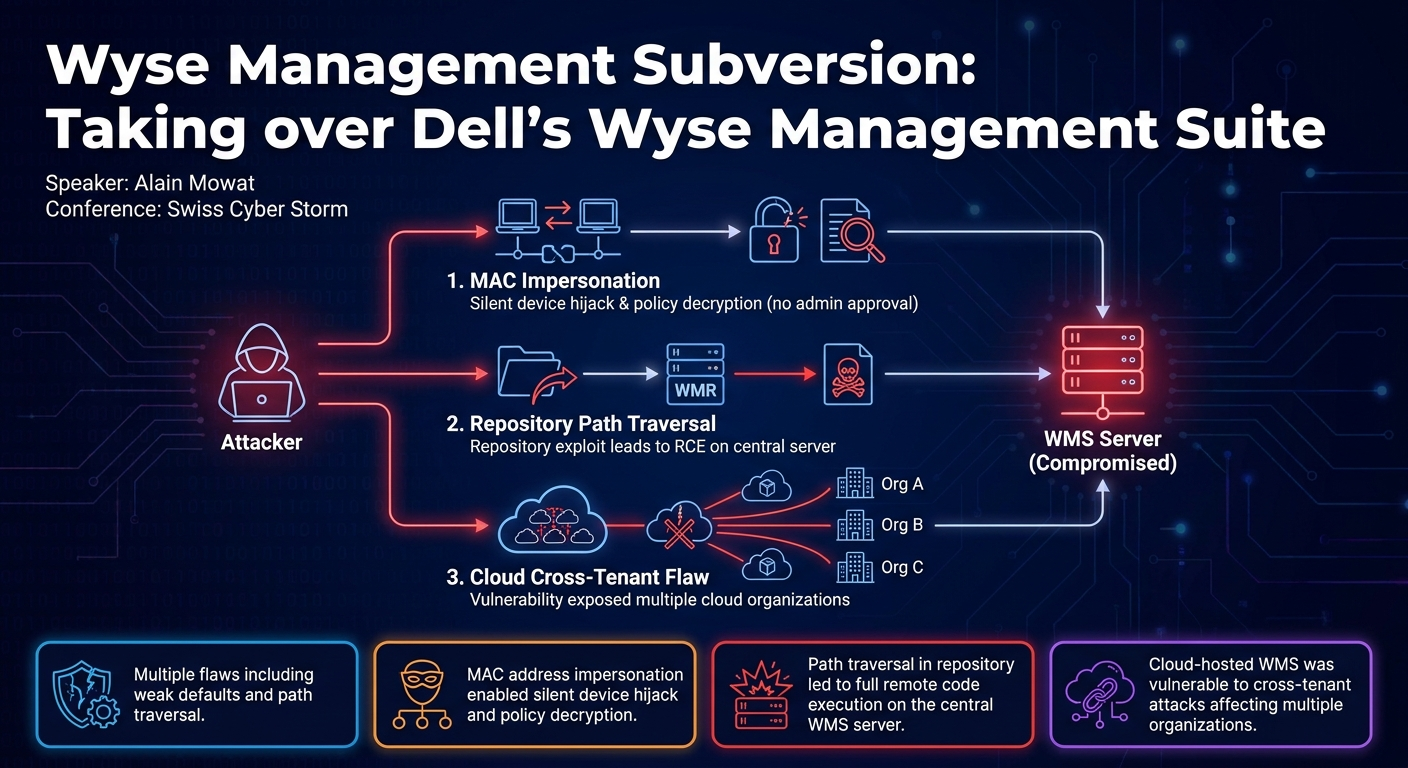
- MAC Address Impersonation: A major design flaw allowed an attacker, by knowing the MAC address of an already enrolled device, to register a new device with that MAC address. This action would silently overwrite the existing device's registration, allowing the attacker to retrieve and decrypt all policies assigned to the original device without requiring administrator validation.
- Group Token Leakage: (Details restricted due to Bugcrowd policy) Mowat identified a separate, severe vulnerability that allowed the leakage of group tokens. These tokens effectively granted an attacker the ability to enroll a device into specific, privileged device groups. While enrolling a new device via this method typically required admin validation, it offered an alternative path to gaining access to targeted configurations.
- Local Repository Impersonation and Malicious Package Distribution:
- WMS uses a "local repository" (identified by device type ID 58) to store and distribute files, applications, and firmware.
- An attacker could register a new device as the local repository (using MAC impersonation or group token leakage) and reconfigure its URL to point to an attacker-controlled server.
- This allowed the attacker to intercept and replace legitimate packages with malicious ones, effectively turning the WMS into a malware distribution platform or a tool for credential harvesting (e.g., via Responder). This attack, however, would disrupt the legitimate WMS functionality.
- Full Compromise of Remote Repository (WMR) via Path Traversal:
- Dell also offers Wyse Management Repository (WMR), a separate application for remote content distribution, often less secured.
- Mowat discovered a path traversal vulnerability in the WMR's log file upload functionality. By exploiting this, an attacker could upload a JSP webshell to the WMR server, gaining full command execution. This required only a valid Wyse identifier, not an authentication code.
- Full Compromise of WMS Server via WMR Path Traversal:
- The most critical finding was an attack chain leading to the full compromise of the main WMS server.
- An attacker could register a fake remote repository with the WMS server. Crucially, this registration did not require administrator validation.
- Subsequently, the attacker could use the "advertise" function in WMS to tell the main server about a file (e.g., a JSP webshell) on the fake remote repository.
- Due to another path traversal vulnerability within the WMS server's file retrieval mechanism, the advertised webshell would be written to an arbitrary location on the WMS server, granting the attacker full remote code execution on the central management server.
- Cloud Environment Vulnerability:
- Dell offers WMS as a cloud service with US and EU tenants.
- The group token leakage vulnerability (the one restricted from detailed discussion) was found to function cross-tenant. An attacker could create a trial tenant, then leak group tokens of other tenants, often revealing company names. This exposed the potential to compromise devices across multiple organizations within Dell's cloud infrastructure, affecting over 300,000 devices in the EU tenant alone.
- Cross-Site Scripting (XSS): A bonus finding was an XSS vulnerability during file advertising. However, due to a strict Content Security Policy (CSP), Mowat was unable to fully exploit it for practical purposes like CSRF token extraction.
These findings painted a picture of a widely deployed enterprise solution with significant security deficiencies, posing a substantial risk to organizations relying on it for endpoint management.
Technical Deep Dive
▶ Watch: Path Traversal Vulnerability to Compromise Remote Repository (17:30)
The technical intricacies of the WMS vulnerabilities reveal a combination of design flaws and implementation errors.
Hardcoded Credentials:
Upon installing WMS, Mowat immediately inspected the underlying MySQL database. He discovered several undocumented user accounts, including system user and mobile admin, pre-configured with the default password "changeitnow". While these accounts could successfully authenticate, they were not assigned to any authorization groups, preventing them from performing any actions within the WMS interface. This design choice, leaving privileged-sounding accounts with default, unchanging passwords, presents an unnecessary attack surface and a potential weak link if authorization mechanisms were ever bypassed or misconfigured.
Encryption Scheme and Key Management:
WMS employs a two-tiered encryption approach for sensitive data. Passwords and other confidential values are stored in the database, encrypted with a tenant key. When these values are to be pushed to a specific device, they are first decrypted using the tenant key, then re-encrypted using a unique device key for that particular endpoint. This device key is managed by the WMS server and distributed to the device.
Mowat found that generating the X-Auth-Code for device authentication involved a specific cryptographic operation: Base64(SHA3(wise_identifier + current_date + authentic_code)). This complexity suggested an attempt at robust security. However, the getKey endpoint, intended for devices to retrieve their own encryption key, was critically flawed. It allowed a registered device to specify any device identifier in the URL and retrieve the corresponding device key. While this action immediately rotated the targeted device's key, making it useless for decrypting past intercepted data, it opened the door for an attacker to gain control over future communications and configurations for an impersonated device.
Device Enrollment and MAC Address Impersonation:
The device enrollment process is central to WMS. Devices can either be manually added by an administrator or self-enroll. Self-enrollment typically requires administrator validation, but this can be disabled. The process involves a device sending a request with a group token (or joining a default unmanaged group), receiving a temporary owner ID, and then registering with a wise identifier and an authentication code.
The critical flaw here was the handling of MAC addresses. If an attacker knew the MAC address of an already enrolled device, they could register a new device using that MAC address. The WMS server would, without requiring any administrator validation, overwrite the existing device's registration. This meant the attacker's newly registered (fake) device would inherit all policies and configurations previously assigned to the legitimate device. By then using the getKey endpoint for their fake device, the attacker could retrieve the new device key and decrypt all policy data intended for the original device. This effectively allowed an attacker to completely impersonate any legitimate WMS-managed endpoint.
Local Repository Subversion:
WMS utilizes a "local repository" (device type ID 58) as its primary storage for applications, firmware, and policy files intended for client deployment. The system expects only one such local repository. Mowat discovered that an attacker, leveraging the MAC address impersonation or group token leakage, could register a new device as the local repository. This action would disrupt the WMS UI, as the server expects a single, consistent local repository. However, the attacker could then reconfigure the local repository's URL to point to an attacker-controlled SMB share or HTTP server. This effectively poisoned the software distribution channel, allowing the attacker to deploy malicious packages, firmware, or configurations to any WMS-managed device attempting to download resources. Mowat also explored using Windows junctions/symlinks to force the server to connect back to itself and store files in arbitrary locations, but this proved impractical due to Windows' security restrictions on remote SMB shares.
Remote Repository and WMS Server Compromise:
Dell's Wyse Management Repository (WMR) acts as a content distribution network for WMS, allowing files to be cached closer to devices. Mowat found that WMR servers were significantly less secure.
- WMR Path Traversal: A path traversal vulnerability was discovered in the WMR's log file upload functionality. By manipulating the filename, an attacker could upload a JSP webshell to an arbitrary location on the WMR server, achieving full remote code execution on the WMR host. This only required a known
wise identifier, not full authentication. - WMS Server Compromise: The WMR compromise paved the way for compromising the main WMS server. An attacker could register a fake remote repository with the WMS server. Crucially, this registration did not require administrator validation, making it a low-friction entry point. Once the fake WMR was registered, the attacker could use the WMS
advertiseendpoint to instruct the WMS server to download a file from the fake WMR. By including path traversal sequences (e.g.,../../) in the file path advertised by the fake WMR, the WMS server would write the file (e.g., a JSP webshell) to an arbitrary location on its own filesystem. This resulted in full remote code execution on the central WMS server, granting an attacker complete control over the entire WMS infrastructure and all managed devices.
Cloud Environment Cross-Tenant Vulnerability:
The impact of these vulnerabilities was amplified by their applicability to Dell's cloud-hosted WMS. Mowat found that the group token leakage vulnerability (the one with restricted details) also functioned cross-tenant. An attacker could create a trial tenant, use it to leak group tokens from other tenants, and often identify the target company name embedded within these tokens. This exposed a massive attack surface, potentially allowing an attacker to compromise devices across different organizations hosted on Dell's cloud WMS, affecting hundreds of thousands of devices (over 300,000 in the EU tenant alone, with potentially more in the US tenant).
Demo / Proof of Concept
▶ Watch: Live Demo: Full Wyse Management Server Compromise (20:00)
Alain Mowat provided a concise and impactful live demonstration of the most critical attack chain: the full compromise of the WMS server.
The demo began with Mowat logging into a local instance of the WMS web interface, showing the default file repositories. He then executed a Python exploit script from his attacker machine. The script performed the following actions:
- Registers a New Remote Repository: The script first sends a request to the WMS server to register a new remote repository. As Mowat explained, this step does not require administrator validation, making it a low-friction initial access point.
- Advertises a Malicious File: Once the fake remote repository is registered, the script uses the WMS
advertisefunction. This function instructs the WMS server to download a specified file from the newly registered remote repository. The script advertises a JSP webshell file, leveraging a path traversal vulnerability in the advertisement request to ensure the webshell is written to a web-accessible directory on the WMS server (e.g., the web root). - WMS Retrieves Webshell: The WMS server, unknowingly vulnerable, retrieves the JSP webshell from the attacker's fake remote repository and saves it to the specified location on its own filesystem.
- Remote Code Execution: Mowat then opened a web browser, navigated to the URL of the uploaded JSP webshell on the WMS server, and demonstrated executing arbitrary commands. The browser displayed the output of the commands (e.g.,
whoami), confirming full remote code execution and complete control over the WMS server.
This demonstration visually underscored the severity of the vulnerabilities, illustrating how an unauthenticated attacker could transition from zero knowledge to full server compromise with relative ease, subsequently gaining control over all managed clients.
Defensive Implications
▶ Watch: Dell's CVEs and Disclosure Process Challenges (24:00)
The findings from this research have significant defensive implications for any organization utilizing Dell Wyse Management Suite, both on-premise and in the cloud.
- Patch Immediately: The most critical action is to update Dell Wyse Management Suite to the latest available version. Dell has published advisories (though with some confusion regarding CVE attribution) and presumably released patches to address these vulnerabilities. Regular and timely patching is paramount for such a critical infrastructure component.
- Enforce Administrator Validation for Device Enrollments: Ensure that the WMS configuration explicitly requires administrator validation for all new device enrollments. While some attack paths (like MAC address impersonation) bypass this, it adds a crucial layer of defense against unauthorized device additions or group token compromises.
- Monitor for New and Replaced Device Enrollments: Implement robust monitoring for any device enrollment activity. Pay particular attention to:
- Unusual spikes in new device enrollments.
- Devices replacing existing MAC addresses. Since MAC address impersonation bypasses admin validation, alerts for such events are vital for detecting potential compromise attempts.
- Devices joining sensitive or high-privilege device groups.
- Reconsider Storage of Sensitive Credentials: The ease with which policy data, including passwords, can be decrypted by an attacker who compromises a device or the WMS server should prompt a re-evaluation of how sensitive credentials are managed within WMS. Avoid storing highly privileged accounts (e.g., domain administrator credentials) directly in WMS policies. If such credentials are necessary, consider alternative, more secure methods for their distribution and use, or ensure they are tightly scoped and regularly rotated. Understand that secrets shared through WMS can ultimately be extracted.
- Network Segmentation: Isolate WMS and WMR servers within a highly restricted network segment. Limit network access to these servers only to necessary administrative workstations and managed devices. This can help contain potential breaches and prevent attackers from easily reaching these critical systems.
- Regular Security Audits: Conduct regular security audits and penetration tests on your WMS deployment to identify any remaining vulnerabilities or misconfigurations. Focus on the attack vectors highlighted in this talk, including device enrollment, repository management, and default credentials.
- Review Dell's Advisories: While Mowat expressed confusion regarding Dell's CVE attribution, organizations should still consult Dell's official security advisories for WMS to understand the scope of fixes and recommended mitigations.
Key Takeaways
- Dell Wyse Management Suite, a widely deployed enterprise endpoint management solution, contained multiple severe security vulnerabilities, ranging from weak default credentials to critical path traversal issues.
- Attackers could leverage MAC address impersonation to silently replace legitimate devices, retrieve, and decrypt their assigned policies without requiring administrator approval.
- A critical path traversal vulnerability in the Wyse Management Repository (WMR) allowed for full remote code execution on WMR servers, which could then be leveraged to compromise the central WMS server.
- The attack chain culminated in full remote code execution on the main WMS server, granting an attacker complete control over all managed thin clients and other endpoints.
- Dell's cloud-hosted WMS environments were also vulnerable, with a cross-tenant group token leakage exposing the potential for mass compromise across different organizations managing hundreds of thousands of devices.
- The disclosure process highlighted challenges in vulnerability management, with Dell's CVE attribution and remediation communications being somewhat unclear to the researcher.
About the Speaker(s)
Alain Mowat is the Head of Research and Development at Orange Cyber Defense in Switzerland. With over 15 years of experience as a pentester, he dedicates his time to exploring complex and interesting research subjects, such as the vulnerabilities discovered in Dell's Wyse Management Suite. His work focuses on in-depth analysis of enterprise solutions to uncover critical security flaws.
Reviews
Dr. Zero (Offensive Security Researcher) — MUST SEE
Mowat pulls on a single thread from a red team gig and unravels Dell's entire thin-client management ecosystem. It is a masterclass in exploiting architectural rot, escalating from a bad key exchange to cross-tenant cloud compromise affecting hundreds of thousands of devices.
Heather Calloway (CISO) — STRONG ACCEPT
This is a textbook teardown of a widely deployed enterprise endpoint management tool. If your organization relies on Dell Wyse Management Suite to control its thin-client fleet, this research dictates an immediate architecture review of your deployment policies and a hard conversation with your vendor risk team about Dell's cloud tenant isolation.